
No call goes unanswered.
Vicky is an AI virtual receptionist. She answers your company's calls through your own phone system, understands what the caller needs and puts them through to the right person, or takes a message. At lunchtime, on holidays and out of hours too.
Free 15-day demo, with up to 60 minutes of calls.

What she does on every call
She handles calls like a good receptionist: calmly, never transferring blind, and never leaving anything hanging.
Answers
With the greeting and name you choose. She introduces herself as a virtual assistant and speaks the caller's language.
Identifies
Recognises your clients by their number once your ERP or CRM is connected. If they aren't there, she asks for their name and company.
Resolves
Answers with your company's information, puts the call through after checking with the person, or takes a complete message.
Leaves a record
The message goes straight to the right person's inbox and every call is summarised in your dashboard.
A voice that doesn't sound like a machine
Choose from natural voices, female or male, and hear your own greeting in each one before you decide. They answer in the caller's language; this is how each voice sounds when it picks up (the assistant introduces itself with the name you choose):
She books tables and appointments on her own
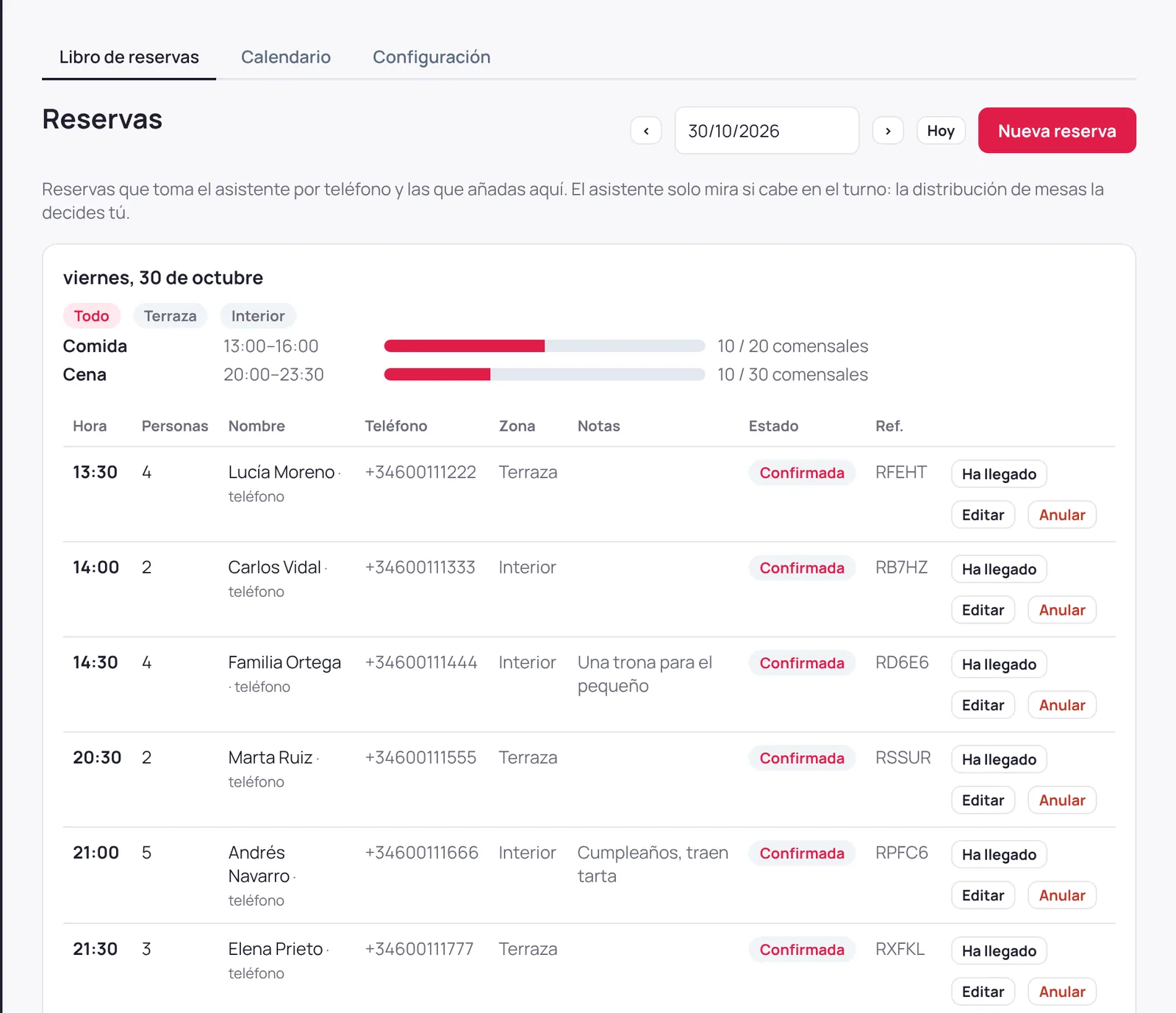
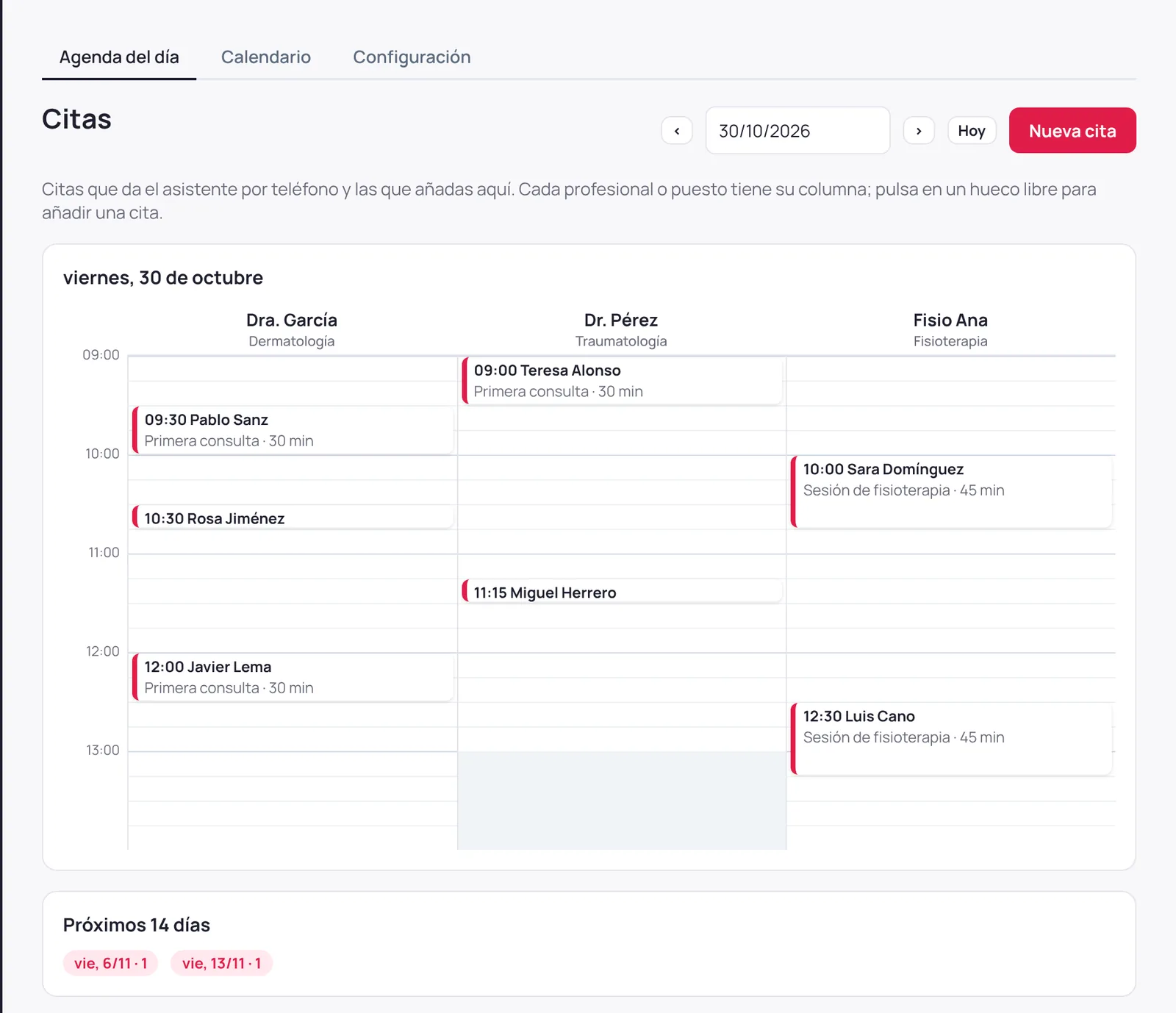
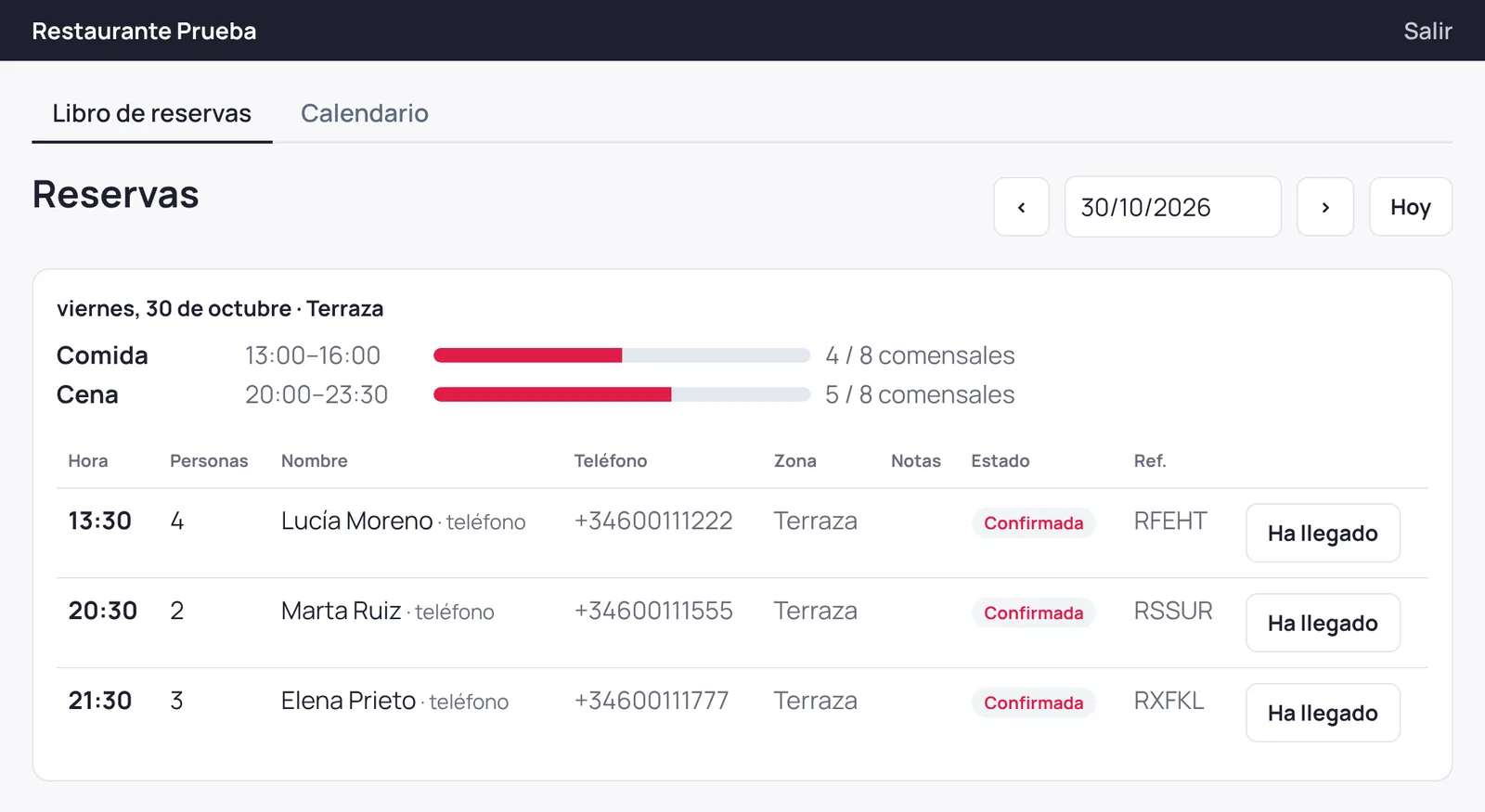
Vicky checks whether there's room, writes it in her book and confirms it to the caller, without anyone on your team picking up the phone. You see it in the dashboard at that very moment.
Table bookings
She checks the capacity of each sitting and each area (terrace, inside…), suggests another time if it's full and books it with name, party size and phone number. Large groups can be left pending your confirmation if you prefer.
Appointments with a professional
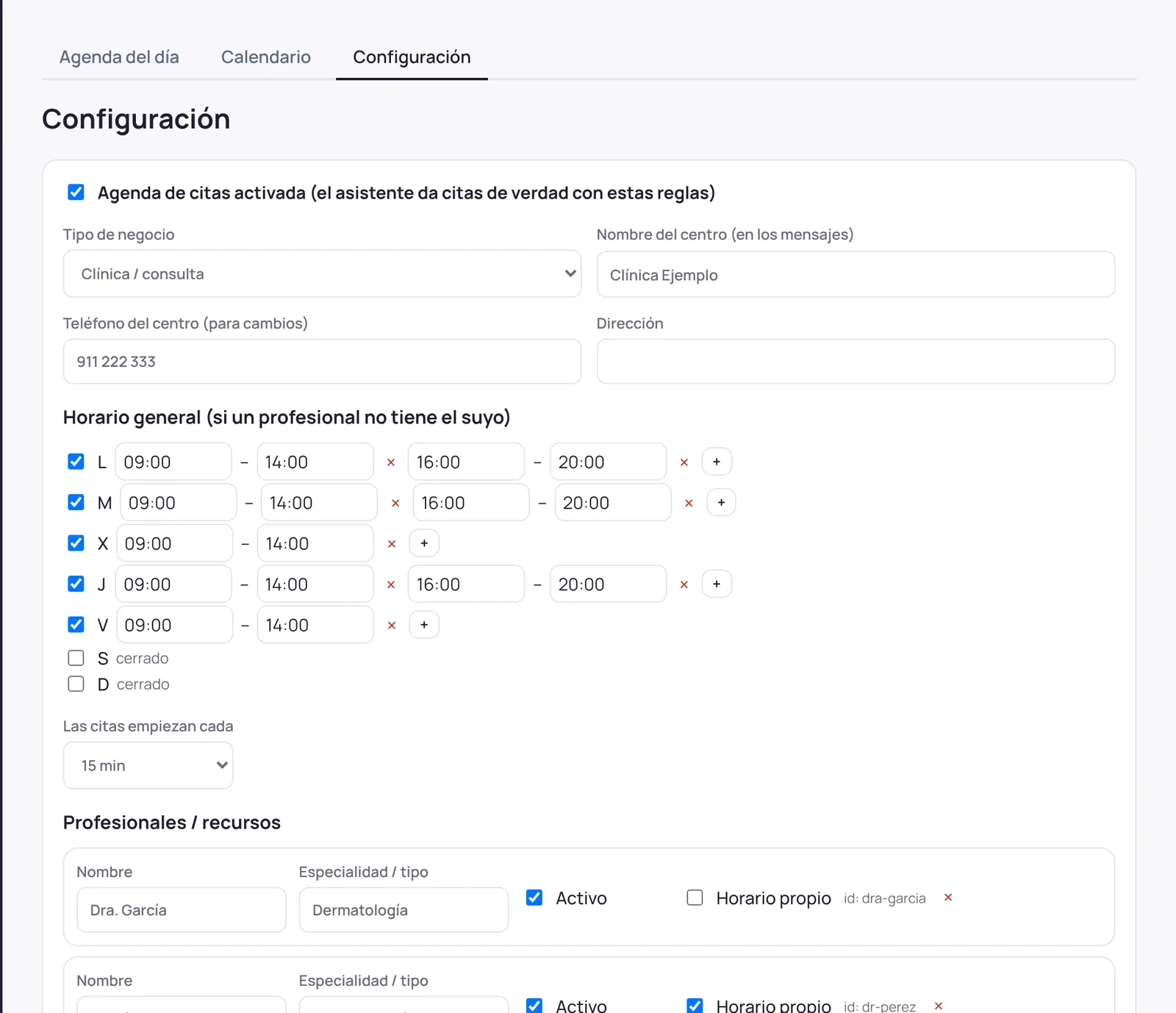
Each professional or station has its own hours and services, each with a duration. Vicky offers the nearest free slots and, if that day is full, finds the next one with room.
Changes and cancellations
Callers can change or cancel their booking or appointment by giving their name or the reference. If they left an email address, they get the confirmation and a reminder the day before.
- You define the sittings, each one's capacity and the areas, or the professionals and their services. The assistant only checks whether it fits: your team assigns the table or the room.
- Every booking carries a reference, its origin (phone or dashboard) and who changed it. Your team marks it as “arrived” or “no-show” with one button.
- Cancellations are recorded, not deleted. And with an existing booking Vicky takes nothing for granted: she reads everything back before saving.
- If you close for a day or a professional is away, you set it in the dashboard and Vicky stops offering those times.
Everyone on your team sees what they need
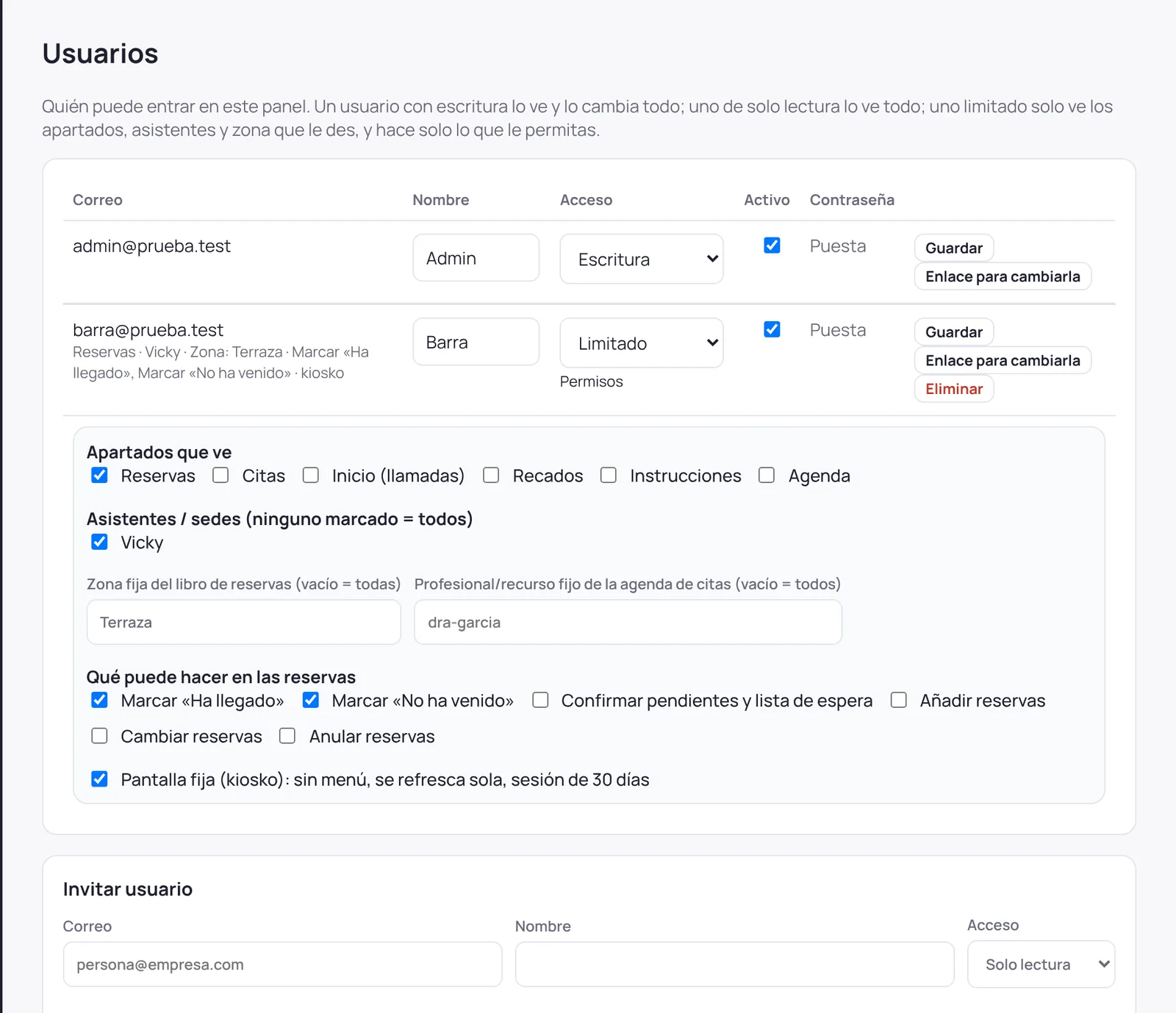
Invite whoever you like to the dashboard and decide what they see and what they can do. A tablet at the bar or the front desk shows the day's bookings and refreshes on its own the moment Vicky books one.
Tailored access
Full, read-only or limited access: only the sections, assistants, area or professional you choose, and only the actions you allow (mark arrivals, confirm, add, change, cancel).
Fixed screen for the bar or the front desk
A login in fixed-screen mode has no menu, stays signed in for 30 days and shows only the book for its area. Ideal for a tablet at the bar or the counter.
Instantly
The book, the calendar and the schedule refresh on their own: when Vicky books, changes or cancels something by phone, it appears on screen at once, with no reload.
Like a secretary: give her instructions
Anyone on your team can call Vicky and tell her how to handle their calls while they're in a meeting, on holiday or off sick. Vicky applies it on every call and stops when it ends.
- Meetings, holidays, sick leave or travel
- “I'm on holiday until Monday”, “I'm off sick this week”, “no calls for me today”.
- Pass their calls to a colleague
- “Have Martha take my calls.” Only to internal colleagues on the same domain; never to a mobile or external number.
- No email messages
- “No messages this week”: Vicky gives them to whoever is covering.
- Recognises who is giving them
- By their extension or phone numbers. If they call from another number, she emails them a code.
- Reads back what she understood
- With the exact dates, and only saves it once the person says yes. It expires on its own, or with “I'm back”.
- And you decide how she answers
- From the dashboard you tell her about your company, who handles each topic and what she must never do.
And she makes calls for you
People on your team can also ask her to make a call: to pass on a message, to put them in touch with someone, or to remind them of something at a set time.
Passes on a message
She calls after you hang up, gives the message in her own words and emails you the reply. If nobody answers, she tries again and lets you know.
Puts you in touch
She puts you on hold, calls, asks whether they can take the call now and connects you. She can stay on as an assistant or to translate. If they can't, she takes down what they say and comes back to you.
Reminds you
“Call me tomorrow at 10 and remind me to phone the accountant.” She confirms the day and time, calls your mobile and, if you don't answer, tries again 10 minutes later and emails you the reminder.
- Switched on person by person in the dashboard, including which numbers she may call: only contacts in your directory and your applications, Spanish numbers too, or international numbers too. Never premium-rate numbers.
- Before calling she reads back who she's calling and what she'll say, and only calls once the person says yes.
- Calls go out through your own phone system, like any other call from your company, and count as minutes.
- An administrator sees in the dashboard every instruction and reminder your team has left by phone, and can cancel them. Who cancelled it is recorded.
She stays on the call and translates
When Vicky puts a call through, she can stay on it. A client who speaks another language and your team understand each other live, and nobody has to take notes.
Simultaneous translation
Each person speaks their own language and Vicky translates what the other says, both ways.
Assistant on the call
Your colleague asks out loud (“Vicky, which invoices are outstanding?”) and she answers with data from your applications.
Summary
She listens silently and leaves a summary of the conversation when you hang up.
- She tells both sides she is a virtual assistant and only speaks when addressed by name.
- She only takes instructions from the person at your company, never from the caller.
- Set per assistant: always ask, or never stay. Configurable time limit.
- While she's on the call, minutes count as on any other call.
Made for your sector
When you create the assistant you choose its role and sector, so it knows what to ask, which words to use and where its limits are.
Clinics and health centres
Reception is no longer tied to the phone, and patients always get an answer.
- Books appointments directly: offers each professional's free slots, writes them in the schedule and confirms them to the patient.
- Each professional can see only their own schedule in the dashboard, if you prefer.
- Answers questions about opening hours, address and services with the information you provide.
- Puts the call through to the consulting room, or takes a message if they can't answer.
- Never gives medical advice; in an emergency she tells callers to ring 112.
- Speaks to foreign patients in their own language.
Law firms and advisory practices
Every call reaches the person handling the matter, with the client's name and the reason up front.
- Identifies the client by their number in your ERP or CRM and announces who is calling and why.
- Takes new enquiries without giving opinions and sends them to whoever handles new business.
- Politely turns away sales calls and gives them your contact email.
- Follows your opening hours, regional holidays and lunch break.
- If a partner says they are travelling, she forwards their calls to the colleague they name.
Restaurants and hospitality
In the middle of service, the phone stops interrupting the floor staff.
- Books tables: checks the sitting's and the area's capacity, suggests another time if it's full and saves the name, party size and phone number.
- Handles changes and cancellations too, by name or reference.
- The bar sees the day's bookings on a tablet that refreshes on its own.
- Answers questions about opening hours, address and whatever you tell her about the menu.
- Speaks to tourists in their own language.
- Puts suppliers through to the manager or takes a message.
IT services and technical support
Every incident is logged as a ticket before it reaches a technician.
- Asks about the problem, opens the ticket in your helpdesk, RMM, ERP or CRM once the client agrees and tells the technician.
- Identifies the company by phone number or tax ID.
- Puts the client through to a technician if they insist or it's urgent.
- Out of hours, logs the incident and explains when the client will be contacted.
- Follows the technician's instructions on the ticket, but never deletes tickets.
Estate agents and property management
No prospect goes unanswered, even when the whole team is out on viewings.
- Takes each prospect's details and the property they're asking about, and passes them to the agent.
- Puts callers through to the agent they ask for, after checking with them.
- Routes calls from owners and residents' associations to the right manager.
- Takes viewing requests, which someone on your team confirms.
- Takes messages out of hours and on holidays.
Everything she does
You set everything up from a simple web dashboard. Changes apply from the next call.
Answers
- Your greeting, her name and her voice
- Natural voices in Spanish from Spain (female and male), plus the ten standard voices. You hear them with your own greeting before deciding.
- Opening hours and holidays
- Several time slots per day, national and regional holidays, your own closing days and lunch break.
- Your company's information
- Answers whatever you tell her about: opening hours, address, services. She doesn't make up what she doesn't know.
- The caller's language
- If the call comes from a foreign number, she greets the caller in that country's language.
- Sales-call filter
- Turns away sales calls with your contact email, and takes down the details of potential clients as a message.
- Recognises your team
- Greets the people at your company by name. She recognises them by their number or, if they call from another one, with a code she emails them.
Transfers and messages
- Never transfers blind
- Plays hold music, tells your colleague who is calling and why, and only connects if they accept.
- Knows who to send it to
- Using keywords: “it's about an invoice” goes to Accounts.
- Complete messages
- If nobody is free, she takes a message and emails it to the right person straight away.
- Instructions from your team
- Staff can call and say “I'm on holiday until Monday” or “send my calls to George”.
- Calls on request and reminders
- Calls on behalf of your team to pass on a message or put them in touch, and calls them at the time they choose to remind them of something.
- Bookings and appointments
- She books them herself in the booking book or in each professional's schedule, with a reference, changes and cancellations by phone, and a reminder the day before.
Connects to your tools
- Identifies the caller
- Looks the number up in your ERP or CRM, so she knows who she's talking to from the start.
- Support tickets
- Opens the incident in your helpdesk, RMM, ERP or CRM once the client agrees and tells the technician.
- Other applications
- Connectors for Odoo, HubSpot, Pipedrive, Zoho, Salesforce, Holded, Jira, Atera, Google Calendar and Microsoft 365, plus your own webhook. We set them up with you.
- Contact directory
- People and departments with their extension or number, importable from Excel.
Keeps you in control
- Web dashboard
- Messages, a summary of every call, and reports in Excel or CSV.
- What your team asks for, in view
- The instructions and reminders your team leaves by phone show up in the dashboard, and an administrator can cancel them.
- Logins for your team
- Full, read-only or limited to a few sections, an area or a professional. Plus a fixed-screen mode for the tablet at the bar or the counter, which refreshes on its own.
- Access for your team
- Read-and-write or read-only access for each person.
- Backup number
- If the voice service ever failed, the call goes to the extension you choose and the person in charge is alerted.
- Privacy
- Audio is not recorded. Your data is stored on servers in the European Union and processed in line with the GDPR.
No surprises: Vicky doesn't record call audio or make sales calls. She only calls out when someone on your team with permission asks her to (messages, putting you in touch and reminders), and those calls count as minutes. Reminders are one-off (a set day and time) and use mainland Spain time. Bookings and appointments go into the dashboard's book and schedule; if you use another booking system, connecting it is quoted separately. Calls use your own lines, so telephony isn't included in the price.
Works with your phone system
No need to change your number or provider. Calls come in and go out through your lines, as they always have.
As one more extension
If your phone system is in the cloud or reachable from the internet, Vicky registers as an extension. You forward to it the calls you want her to answer.
Through a trunk we provide
If your phone system is in your office, we give you a SIP trunk filtered by your public IP. Vicky uses the same trunk to transfer calls.
Works with standard SIP phone systems. Tested with 3CX and with Asterisk and FreePBX.
Simple pricing
You pay for each assistant and for the minutes it answers. Every role costs the same.
Per assistant
+ VAT
- Minutes included200 per assistant
- Shared poolminutes from all your assistants add up
- Extra minute€0.25 + VAT
- 500-minute bundle€89 + VAT (€0.18 per minute)
- Support€100 a year per company
- Rolesall at the same price
- Dashboard, reports and loginsincluded
One assistant covers one department or site. We count the minutes Vicky answers each month, rounded to the minute. Support is per company, not per assistant. Phone charges are not included.
Work out your fee
Support: €100 a year per company, billed separately.
Try her first: 15 days free, with up to 60 minutes of calls.
Frequently asked questions
Do callers know they are talking to an AI?
Yes. Vicky introduces herself as a virtual assistant in her greeting. The GDPR and the EU AI Act require it, and it avoids misunderstandings.
What does she sound like?
Natural voices in Spanish from Spain, female or male, which you can hear on this website and in the dashboard with your own greeting. You can also pick one of the ten standard voices.
Do I need to change my phone system or number?
No. Vicky connects to your existing phone system as an extension or through a trunk. You decide which calls she gets and when.
What if she doesn't understand something?
She asks, as a person would. If she still can't resolve it, she takes a message or transfers the call. If the caller insists on speaking to someone, she puts them through during working hours.
Can she handle calls for someone who's on holiday or in a meeting?
Yes. The person calls Vicky and says, for example, “I'm on holiday until Monday, send my calls to Martha.” Vicky reads it back with the dates, saves it once they say yes and applies it until then. Callers aren't told the reason for the absence.
Can she translate a call?
Yes. After putting the call through, Vicky can stay on it and translate live between the caller and your colleague, each in their own language. She can also stay as an assistant or to write the summary.
Can she call someone on my behalf?
Yes, if your administrator has switched it on in the dashboard. Ask her, for example, “call Laura Green and tell her the quote is ready; then email me her reply” or “put me through to Peter Smith on his mobile and stay on to translate.” Before calling she reads back who she's calling and what she'll say.
Can she call me to remind me of something?
Yes. Tell her “call me tomorrow at 10 and remind me to phone the accountant.” She confirms the day and time, calls your mobile (or another of your numbers if you say so) and, if you don't answer, tries again 10 minutes later and emails you the reminder. Reminders are one-off.
Who controls what the team asks her by phone?
An administrator sees every active instruction and reminder in the dashboard, with their history, and can cancel any of them. Who cancelled it is recorded.
Can she book appointments and tables directly?
Yes. You define the sittings and capacity (or the professionals and their services) and Vicky checks whether there's room, books it and confirms it to the caller with a reference. Your team sees it in the dashboard instantly and can mark arrivals, confirm, change or cancel. Callers can also change or cancel by phone.
How does my team see the bookings and appointments?
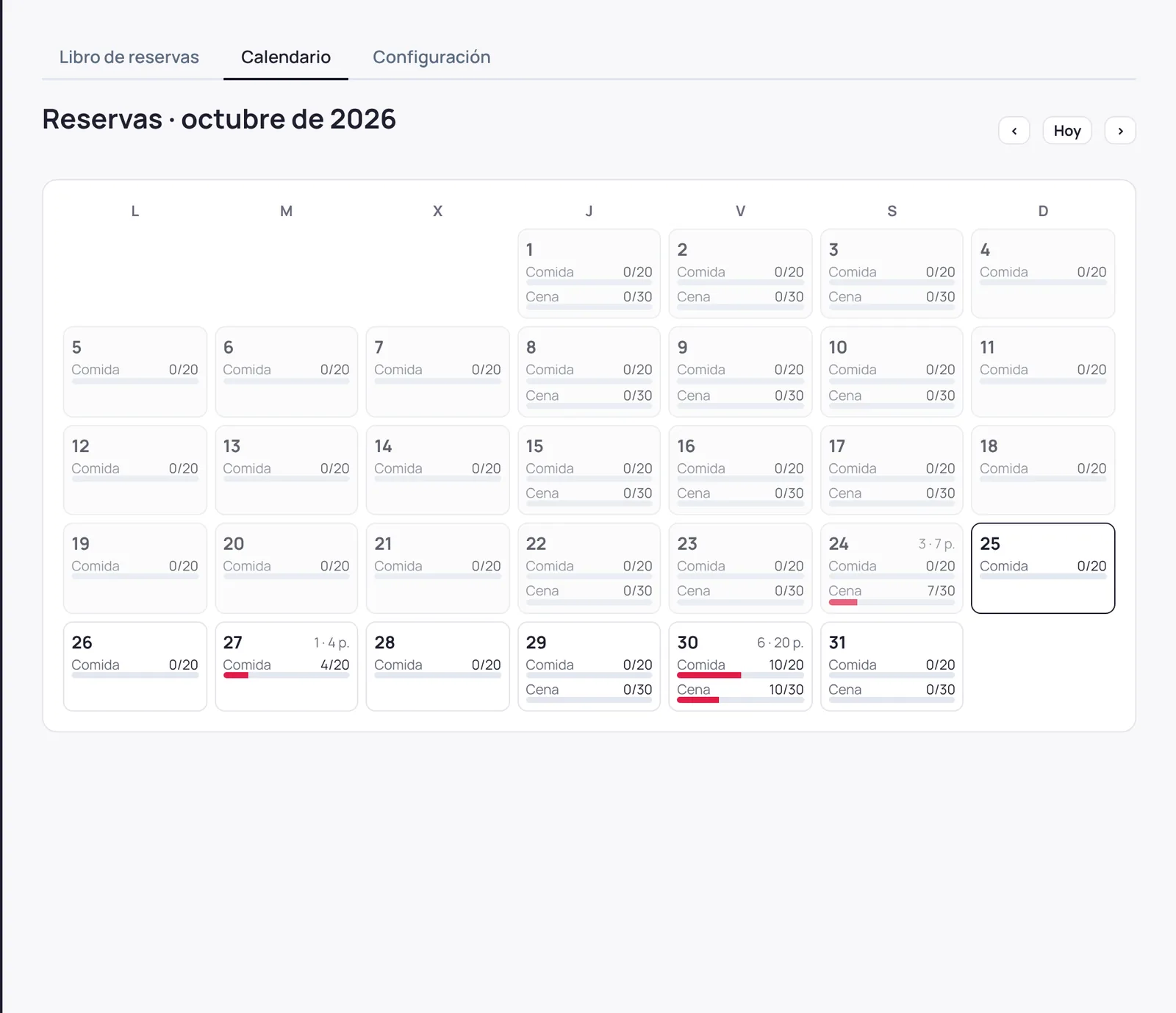
In the dashboard: a day book with each sitting's occupancy, a month calendar and, for appointments, a schedule with one column per professional. You can give limited logins (for example, the bar only sees its area and only marks arrivals) and a fixed-screen mode for a tablet, which refreshes on its own the moment Vicky books something.
Are calls recorded?
Audio is not recorded. A written record of each call (who called, why and how it ended) is kept so you can check it in your dashboard.
How does the minute bundle work?
If you use a lot of extra minutes, a 500-minute bundle for €89 works out at €0.18 per minute instead of €0.25. It is added to the month's shared pool: keep it every month or buy it only in busy months. Unused minutes don't carry over.
What does support include?
For €100 a year per company: email and phone assistance during office hours, configuration changes you'd rather not make yourself (hours, directory, instructions), reconnection to your phone system if you change provider, and product updates. New integrations with other applications are quoted separately.
Where is my data?
On servers in the European Union. Speech processing is carried out by OpenAI under the safeguards the GDPR requires for international transfers. SYSCAD acts as data processor.
What counts as a minute?
A minute of a call answered by Vicky. All the month's minutes are added up and the total is rounded to the minute. The included minutes of all your assistants form a shared pool.
What if the service fails?
You set a backup number. If the voice service didn't respond, the call goes to that extension and the person in charge is alerted, so the call isn't lost.
How do I get started?
Request the demo. We give you access to the dashboard, connect Vicky to your phone system, and for 15 days she answers your calls free of charge, up to 60 minutes.
Try her with your own calls
Leave your details and we'll write to you within one working day to set her up.
- 15 days free, with up to 60 minutes of calls
- Connected to your phone system, with your hours and directory
- Dashboard access from day one
- If you continue, €59 per assistant per month + VAT, with 200 minutes included